Your Footage.Your Machine.Your Rules.
One suite, start to finish
From the first shot list to the final delivery.
Plan it, shoot it, cut it, ship it. DISKO covers the whole run — and nothing leaves your drive until you want it to.
DISKO LOCAL
Desktop App · No subscription
Your whole library, understood — right on your machine. Nothing uploaded, nothing rented.
- AI face & voice recognition
- Full-shoot transcription + search
- Real-time LUT preview
- Multi-cam sync → Premiere / Resolve
- Native 10-bit HEVC & ProRes playback, R3D workflows
- GPS map view + visual duplicate detection
Mac first. Windows next, if enough of you ask.
Download for Mac — free 7-day trialDISKO CLOUD
Write, Review & Deliver · Free or $12/mo
Write it, plan it, review it, deliver it — all in the browser. No desktop app required.
- Screenwriting + shot list tools — free
- Frame-accurate review + drawing tools
- Client portals & branded showcases
- Portfolio video pages at your own URL
- Version stacks + live transcripts
- Brand kits, embeds & view analytics
Reviewers are always free. Clients never make an account.
Start free — no cardDISKO LOCAL
Everything happens on your machine.
No uploads. No waiting. No monthly anything. Just you and your drives.
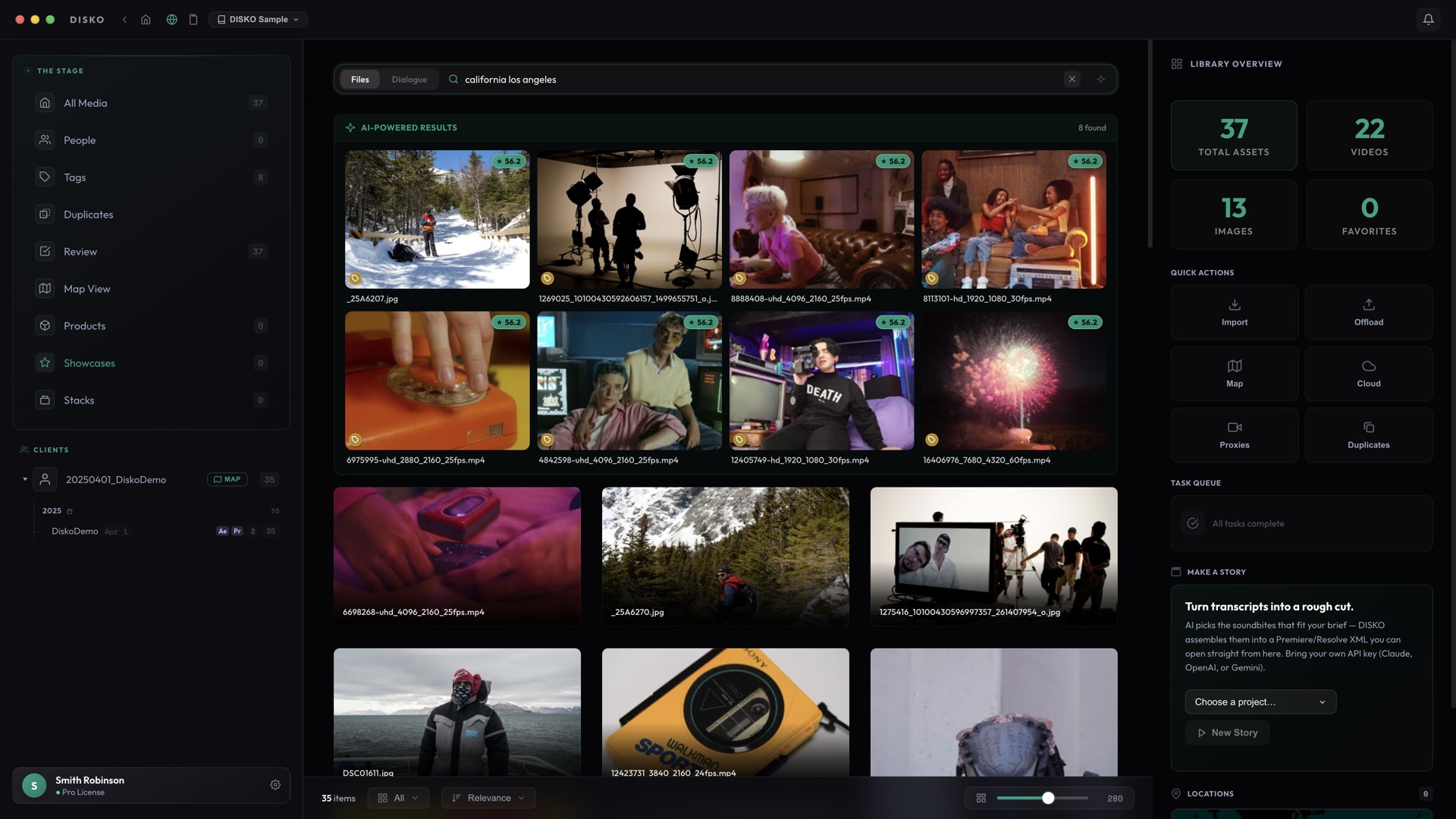
It actually understands your footage.
On-device AI writes a plain-English description of every shot — then lets you search the whole library by meaning, scene, spoken word, or face. Type “guy running from a boulder” and the right frame rolls in, no filename or tags required. Runs entirely on your Neural Engine. Nothing uploaded.
Tag every face. Identify every voice.
Spots every face in your library and lines them up. Tag one — it knows the rest. For interviews, run speaker diarization and DISKO matches voice to face. All on Apple Silicon. No cloud. No GPU rental. Your Mac does the dirty work while you cut.
Transcribe entire shoots. Search every word ever said.
Not a clip — the whole shoot. Run speaker ID on key clips and your transcript reads like a script. Export SRT subtitles or throw structured text into Claude and say “find every time Dutch says something badass.” Search across every word spoken in your entire library.
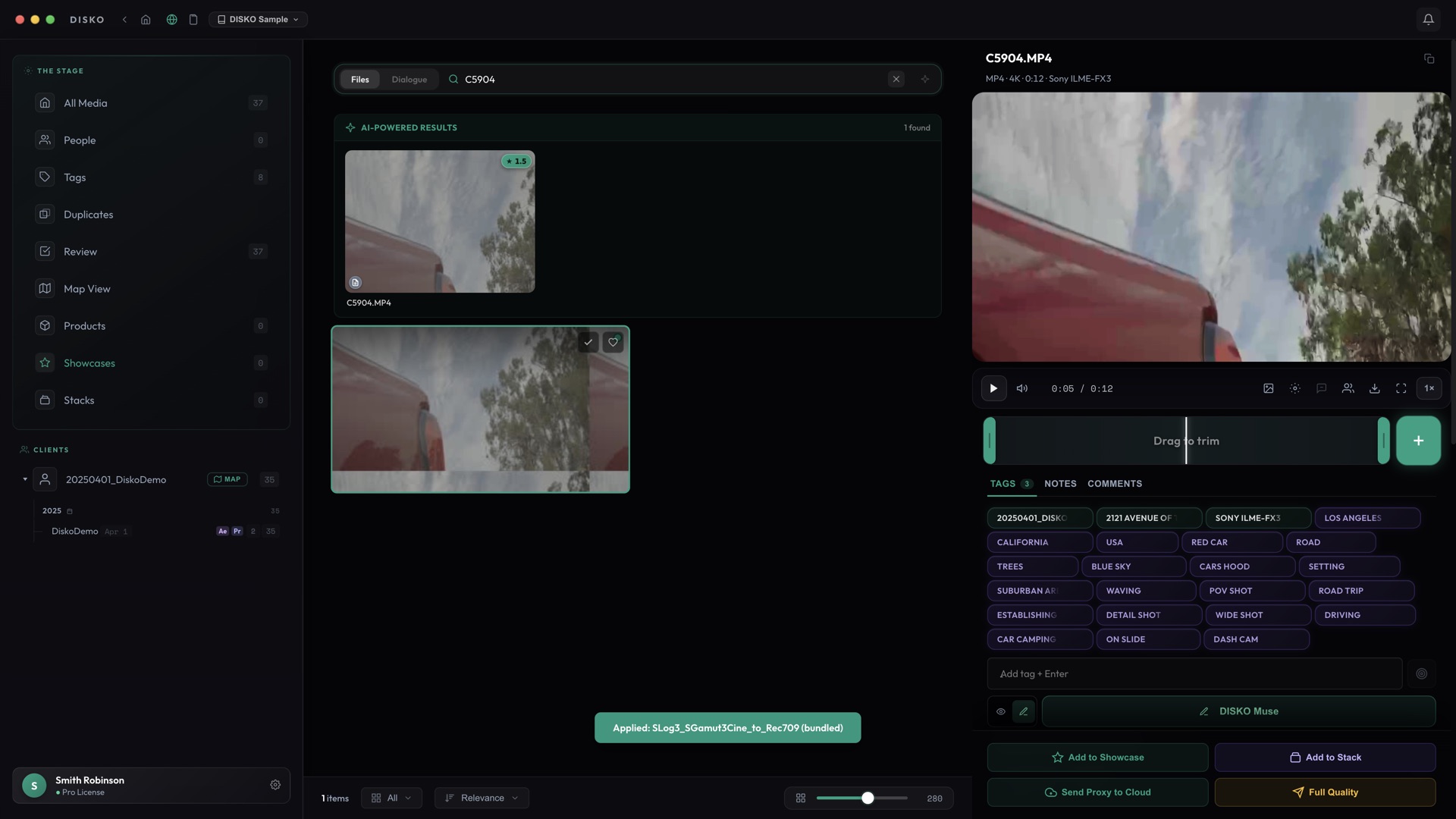
See your footage in color. Not surveillance-cam grey.
Auto-detects your camera and applies the right LUT instantly. Bring your own or use the bundled ones. Real-time WebGL preview while you browse. Finally see what your footage actually looks like while organizing — not flat, washed-out log.
Your footage lives in Drive. Search it like it’s local.
Point DISKO at a Google Drive folder and it indexes every clip right where it sits — thumbnails, tags, faces and transcripts, all searchable — without pulling down a single gigabyte. Preview in place; grab the original only when you’re ready to cut. Perfect when the finals live in the cloud and the whole crew needs to find them.
Teach it your product once. It finds every shot of it.
Name a product, drop in a few photos, and DISKO learns what it looks like — then finds it across every photo and video in your library, sampling extra frames from deep inside long clips. Review matches one keystroke at a time; every ✓ and ✗ trains it sharper, and once it’s calibrated the confident matches add themselves. Teach the parts too, then search like you talk: “aero one props closeup.” Assign a product to a client and DISKO only searches their media — and only their portal ever shows it.
And that’s the short list.
Every one of these ships in the build you can download right now.
Total Recall Search
One bar, six signals at once — faces, dialogue, your tags, AI tags, filenames, and the look of the shot. Type “andy bananas mountain” and the right frame floats up.
Make a Story
Brief an AI like a producer and it drafts a rough cut from your transcripts — straight to a Premiere or Resolve timeline. Your API key, your call.
NLE Export
Mark in/out, hit export. XML drops right into Premiere or Resolve with timeline markers.
Multi-Cam Sync
Transcript alignment + audio waveform matching. Gets you 90% to a synced multicam edit with a ready-to-cut XML.
Native Pro Playback
10-bit HEVC, ProRes, DNxHD, MXF — plays natively via mpv with real-time LUT preview. No transcoding to scrub.
GPS Map View
Every geotagged clip on an interactive map, place names auto-tagged from the coordinates. Find a shot by where you shot it.
Teach It Anything
Draw a box, name it, hit retrain — DISKO learns your products, props, and gear from a handful of frames. Accuracy is measured on your own labels, not a made-up progress bar.
Duplicate Detection
Visual AI finds near-dupes across drives using image embeddings. Tiered confidence. Reclaim terabytes without the guesswork.
DISKO for Premiere
Beta · comes with DISKOThe whole library, docked inside Premiere Pro. Search in plain sentences — who’s on camera, what they said, even the camera it was shot on — jump to the exact spoken moment, preview in the Source monitor, and land clips in bins that mirror your projects. No exports, no round trips. It ships inside DISKO — one click in Settings → Integrations installs it into Premiere.
Needle Drop
New · in the panelSound design at the speed of a click. Point Needle Drop at your effects library and it’s indexed and searchable in seconds — even the folder named “wooshes.” Type what you hear and one click drops the sound onto a free audio track with its peak locked to the playhead, never stepping on the audio you already have. WHOOSH / HIT / RISER buttons for the ones you reach for constantly — click again to swap for a different one — a bed that fills a whole shot, hit every cut in a selection at once, and “Read the room,” which looks at the frame and suggests sounds you actually own. All on your machine.
DISKO CLOUD
This is the screening room. Live.
Pin the frame. Draw on the glass. Stack versions. Scroll the transcript. This isn’t a mockup — it’s the actual thing, right here.
Timestamped Comments
Frame-accurate notes with time ranges. Click any comment to jump right to it.
Draw on the Frame
Circle it, arrow it, scribble on it. Every mark saved to its comment.
Side-by-Side Compare
Two versions, synced playback. Spot what changed without squinting between tabs.
Version Stacking
Drag to stack. V1, V2, V47 — grouped, with an undo toast when you fumble.
Portfolio Pages
Clean video pages at your own URL. Embed anywhere — WordPress, Notion, Squarespace.
Client Portals & Showcases
Branded delivery pages with your logo and colors. Password when you want it.
Brand Kits
Colors, type, and logos on a page clients can actually reference. Click-to-copy hex.
View Analytics
Plays over time, top clips, where people watch from — and a heatmap of every rewind.
Notes Land on Your Desktop
A client comments in the cloud and DISKO lights up — flagged file, review link, ready to cut.
External reviewers ride free. Your clients never punch a password.
New pressing
Your portfolio, pressed as a whole website.
Disko Ball spins a full site straight from your library — a film-strip hero you scrub like footage, galleries, your colors. No page-builder homework.
NAME
HERE
the good one
A hero that plays
Visitors scrub a film-strip reel of your actual work — not a static banner with a stock photo.
Wired to your library
Point sections at projects and new work lands on the site by itself. Cut once, published everywhere.
Your colors, one click
Theme presets re-skin the whole record — or dial in your own palette, type and grain.
Your domain — or take the master tapes
Connect your own domain, or export the whole site as files and upload it to any host you like. It’s yours.
Liner notes on your audience
Who visited, where from, off which search — per-site analytics, built in.
Client portals and showcases spin on the same turntable — one look, everywhere your work goes.
Bonus tracks
Screenplays and shot lists. Free with any account.
Make a free account and these are just… there. No trial, no upsell, no “starting at.”
Screenplays
Write in real screenplay format — traditional or two-column A/V — with a co-writer editing live right next to you. Your back catalog comes along: Final Draft imports clean (.fdx, and yes, even ancient .fdr files), plus Fountain and PDFs — then search digs through every page of every script to find that one line of dialogue. Export a PDF formatted exactly like Final Draft. Costs nothing.
Shot lists
Build a shot list, pull it up on set, tap shots off as you get them. Mark the keeper takes and they ride into DISKO desktop when you import — so the editor knows exactly where the good one is. Also free.
Plus a whole workshop of free toys — a video converter, a metadata peeker, and more. Poke around →
Pricing that won’t make you cry.
Two products, two prices, and reviewers ride free.
One-time purchase
DISKO LOCAL
Founders pricing — $149 after launch, when major upgrades go paid. Not per month. Not per seat.
7 days free. No credit card required.
Subscription
DISKO CLOUD
Screenplays + shot lists included. Actually free.
Desktop sync, review links, client delivery — the encore.
Founders rate — locked for life. $15/mo after launch.
External reviewers are always free. Clients never need accounts.
Each one works on its own. Together, they’re the whole studio.
Straight talk
The questions everyone asks first.
Short answers. No fine print.
- What is DISKO?
- DISKO is a media asset manager (MAM) for Mac, for people who shoot and cut video — wedding and event filmmakers, documentary editors, YouTube teams, commercial production. It organizes whole drives of footage, AI-tags what’s on screen, transcribes every word with speaker labels, finds a person everywhere once you name them, and lets you search all of it in plain language. The optional DISKO Cloud adds review links, client portals and delivery for the moment you want to share.
- Does DISKO upload my footage?
- Nothing uploads unless you send it. All the AI — tagging, transcription, faces, shot descriptions — runs on your Mac, and footage only goes to DISKO Cloud when you choose to sync a project for review or delivery. The honest exceptions: Make-a-Story sends that project’s transcripts to the AI provider you pick (with your own API key), location names you type are geocoded online, and a bug report sends its logs.
- What does DISKO cost?
- The desktop app is a one-time purchase — $99 during founders pricing ($149 after launch) — with lifetime updates and no subscription required, after a 7-day free trial. DISKO Cloud has a free tier (2 GB, review links, plus free screenwriting and shot-list tools) and a Pro plan at $12/month for founders ($15 after launch) that adds desktop sync and 100 GB.
- What cameras and formats does it work with?
- Anything you would actually shoot with: drones, mirrorless, cinema cameras, phones, action cams and stills. Playback is native for ProRes, DNxHD, MXF, 10-bit HEVC and everything else FFmpeg can decode, with real-time LUT preview that auto-detects log profiles from Sony, Panasonic, Canon, RED, Blackmagic, ARRI, DJI and GoPro.
- Does it replace Premiere Pro or DaVinci Resolve?
- No — it feeds them. DISKO organizes, searches, selects and multicam-syncs; then it exports selects, rough cuts and synced sequences as XML straight into Premiere Pro or DaVinci Resolve, so the edit starts with the footage already found.
- What do I need to run it?
- An Apple Silicon Mac (M1 or later). The AI runs on the Neural Engine, so the M-series chip is the whole point. Nothing else to install — no Python, no FFmpeg, no plug-ins (one AI model is a free, one-time download inside the app) — and the desktop app never requires the cloud.
- Who makes DISKO?
- DISKO Labs — Smith Robinson Multimedia LLC, a working filmmaker’s independent software shop. It is self-funded and built around the footage problems that turn up on real productions every week.
Roll tape.
A week on the house, no card. Worst case, five minutes gone.
Grab the appMade by an Emmy-winning team of working filmmakers.